Q-Bot, the robot that automates your 2FA
A monthly subscription, with no long-term commitment. Delivered to you, operational within 48 to 72 hours.
Rental, all inclusive, no hidden fees. We give you the rate during the demo.
What 2FA costs you today
Two numbers, yours. Everything is computed in your browser, nothing is sent.
Finding someone available, unlocking the phone, reading the code, typing it in, restarting the run.
Time given back to your teams
36 h 45
per month
That is 5.3 testing days, at seven hours a day.
3 testers × 35 min × 21 working days
Book a demoAnd that is only the time you can count. A nightly run that stops on a 2FA step at two in the morning does not cost thirty minutes: it costs a day of feedback.
One subscription, all inclusive
No installation fees, no surprises. Q-Bot fits into your test budget like a standard tool.
Monthly subscription
All-inclusive rental, no commitment
- Q-Bot robot rental
- Technical support included
- Robot replacement in case of failure
- Automatic software updates
- Web interface + REST API included
- Email and phone support
- Onboarding and training included
Why rental?
Because Q-Bot is a physical robot that keeps evolving. Rental always gives you the latest version, software updates included, and it covers the hardware risk: if the unit fails, Q-Leap replaces it. No long-term commitment, and the spend stays an operating expense.
Up and running in 4 steps
From order to your first automated 2FA tests: allow 48 to 72 hours.
Personalised onboarding
Our team prepares your Q-Bot and configures network access according to your needs.
Delivery & installation
Q-Bot is delivered to you. Plug it in, connect it to Wi-Fi, and it is ready.
First 2FA tests
Create your first scenario via the Web interface and trigger it from Selenium, Cypress or the tool in your pipeline.
How does Q-Bot automate your 2FA?
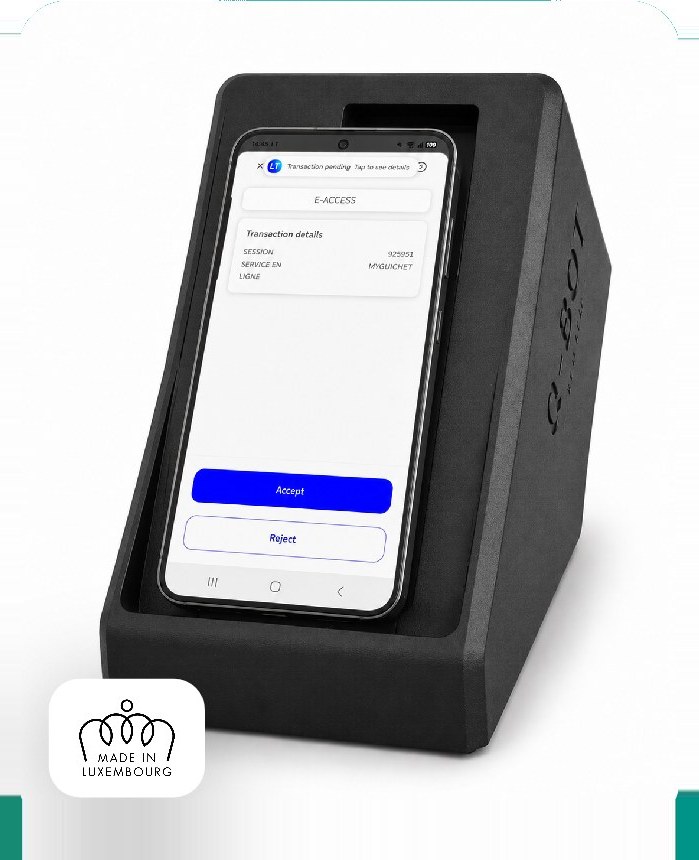
Your test calls the Q-Bot API, or the companion app detects the 2FA notification on the phone by itself. Q-Bot then replays the saved scenario: taps, swipes and wait times land on the device's physical screen over ADB. The step clears in under ten seconds and the test resumes.
Build
Build the scenario in the web interface: upload a screenshot of the 2FA screen, place numbered tap points, set wait times. No scripting required.
Trigger
Your test scenario calls the Q-Bot API. Or the companion app fires on its own, the instant a 2FA notification reaches the device.
Execute
Q-Bot replays the scenario on the smartphone connected over USB: taps, swipes and waits, via ADB.
Continue
2FA handled. Pipeline unblocked. The test continues from exactly where it left off.
Five situations where the pipeline unblocks
From banking login flows to nightly CI regressions, here is how QA teams are putting Q-Bot to work.
What you get with Q-Bot
Responsive support
The Q-Leap team is available by email and phone. Guaranteed response time within 24 business hours.
Replacement guaranteed
In case of an unrepairable remote failure, we send a working robot. No prolonged interruption.
Complete confidentiality
Q-Bot operates on your local network. Scenarios and their step images stay on the device. No data leaves your premises.
Continuous updates
The embedded software is regularly updated to support new 2FA apps on the market.
Made in Luxembourg
Q-Bot is designed and assembled at Q-Leap's premises in Bertrange. Guaranteed proximity for your support.
Training included
Full onboarding with your QA team to master the Web interface and API from day one.
Integrates into your existing stack
Compatible with Selenium, Katalon, Robot Framework and other automation solutions: its REST API is called straight from your test pipeline, with no SDK and no agent to install.
- Selenium
- Cypress
- Appium
- Playwright
- Robot Framework
- Katalon
- TestComplete
- Jenkins CI
- GitLab CI
- REST API
Before ordering
No, the Q-Bot subscription has no long-term commitment. You can cancel at any time by contacting us by email or phone.
Once the contract is signed, allow 48 to 72 hours to receive your Q-Bot and be operational. Installation requires no on-site technician.
Q-Bot is compatible with all types of smartphones for two-factor authentication (LuxTrust, Google Authenticator, Microsoft Authenticator, etc.). To check compatibility with your own app, contact us for a personalised demo.
Absolutely. Book an appointment with Sylvain Perez for a free, personalised demo. You'll be able to see Q-Bot working with your 2FA apps before any commitment.
Ready to automate your 2FA?
Contact Sylvain Perez, creator of Q-Bot, for a free demo and your personalised offer.
Or by email: bot@q-leap.eu